You may have wondered how the programming language lexemes are turned into a series of 0’s and 1’s, aka binary files?
Let’s discover that together, step by step:
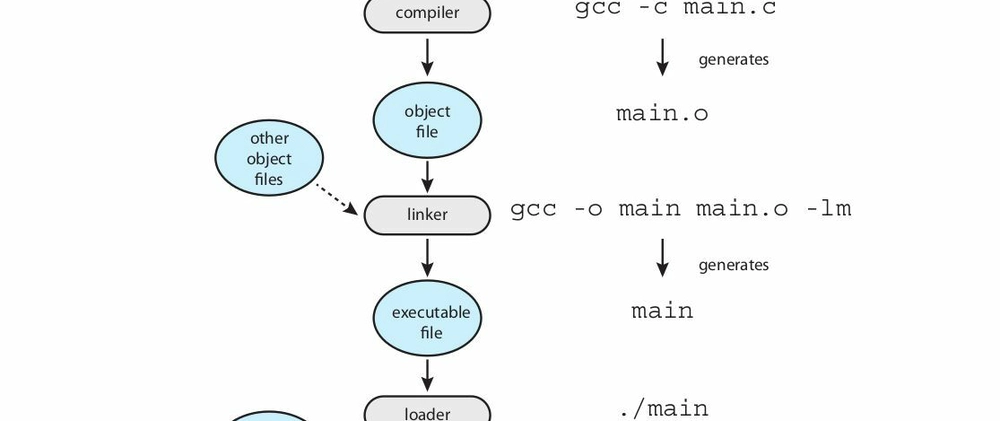
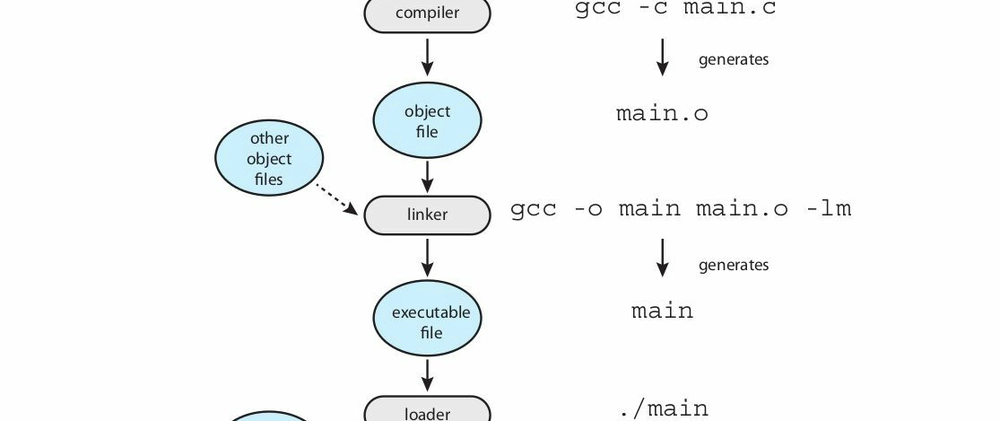
Figure 2.11 - Book reference: Operating System Concepts.
From binary on disk to a running process
Usually programs, a.out or program.exe (games, word processors, web browsers…), reside on your disk as binary executable files. In order to execute one of them, you need to fetch it from disk and put it in memory, where it waits until it’s scheduled to run. It then becomes a running program, also known as a “process”, which has a specific amount of memory addresses and is executed by the units of the CPU’s core with the help of specific registers like program counters, IR, and general-purpose registers.
But we don’t write operating systems and enterprise systems in binary, right?
We need a human readable language. Let’s choose a compiled programming language like C to understand the process of compilation.
Compiling and assembling
After writing your program.c source code in human readable C, the source code is compiled and assembled into a relocatable object file program.o: machine code that can be disassembled and turned into geek-readable assembly. (We will talk about the phases of compilation, lexing, parsing, AST… in future articles.)
So we have now an object file. But we may have called several functions like printf(), which were also written by system programmers before us, to give us a layer of abstraction and increase our productivity. They are compiled, aka turned into an object file too, as part of GCC.
Linking
We now need to link all those object files and make them a single binary executable file that can be loaded into memory. This mechanism is done by what we call a “linker”. (This is static linking.)
Loading
The mechanism of loading the binary executable file into memory, so it can be executed by one of the CPU’s cores, is done by the loader. It’s also responsible for address reallocation in memory.
Dynamic linking
You may have heard about DLL (dynamically linked libraries) files in Windows, right? Now we speak about dynamic linking. Actually, most systems allow programs to dynamically link libraries even if the program is already loaded and started execution. That’s good from a memory optimization perspective, because the programmer may include a library and not use it during runtime. I am sure we all did that before.
And you know that modern systems allow multiple processes to share a DLL? Yes, they do!
And now you have a binary executable program in memory, also known as a process, with its own memory addresses.
I will talk deeper next time about the compilation phases, and how the CPU fetches, decodes, and executes instructions and data from the bounded virtual memory of the process.